
CPL: what it is and how a lead differs from a client
CPL (cost per lead) is the cost of one lead: ad spend for a period divided by the number of leads in that period. The examples in this article are in Ukrainian hryvnias (₴, UAH).
Cost per lead = ad spend ÷ number of leads
A hypothetical example: ads cost 20,000 ₴, 50 leads came in, so the cost per lead is 400 ₴.
First, agree on what counts as a lead. We count any phone call and any form submission as a lead, because until you talk to the person you cannot tell who will buy. Then there are two separate terms:
- A qualified lead is a person who fits your services and really wants to buy. This is an extra metric that you track in a CRM; it does not replace the count of all leads.
- A client is someone who has paid.
As a KPI, CPL is useful only next to the ceiling from the next section: a figure of 400 ₴ is neither expensive nor cheap on its own.
How to work out an affordable cost per lead
The affordable cost per lead is a ceiling: above it, ads run at a loss. You calculate it from three numbers of your own.
- Average ticket. What a client pays for one deal.
- Margin. The share of revenue that is left after the direct costs of delivering the service: materials, the wages of the technician or lawyer, travel. This is not yet net profit.
- Lead-to-sale conversion. Take the leads that came in over a chosen period and see how many became paying clients. Give them the time your service usually needs to get to payment; otherwise the figure comes out too low.
Lead price ceiling (the most you can afford to pay per lead) = average ticket × margin × lead-to-sale conversion
Why it works. From each client you keep ticket × margin, but only a share of leads become clients. So one lead brings, on average, that amount multiplied by that share.
This is the preliminary maximum you can spend per lead: a ceiling for ad costs before sales team salaries, contractor fees, taxes and the profit you want. Your working target is lower, and how much lower is the owner's decision.
If your sales are a mix of several services, do not average the margin percentages across services: calculate from total revenue and total direct costs for the same deals. And do not compare the cost per lead for all leads with a ceiling calculated from the conversion of qualified leads, or the other way round.
A worked example with hypothetical numbers
This is a hypothetical example, not a case study: all the numbers are made up for the calculation and are not a benchmark for your niche.
A service company: an average ticket of 6,000 ₴, a 40% margin, and 20 of every 100 leads become clients.
| Step | Calculation | Result |
|---|---|---|
| What is left from one client after direct costs | 6,000 ₴ × 0.4 | 2,400 ₴ |
| Lead price ceiling | 2,400 ₴ × 0.2 | 480 ₴ |
| The same ceiling if 15 of 100 leads become clients | 2,400 ₴ × 0.15 | 360 ₴ |
If a lead costs 400 ₴, that leaves 80 ₴ for all other costs. If it costs 500 ₴, that is 20 ₴ above the ceiling.
The third row shows that the ceiling changes when your conversion changes. Say conversion fell from 20% to 15%: the calculated ceiling dropped by a quarter (from 480 to 360 ₴), although the ads did not change. A lead at 400 ₴ used to leave 80 ₴ for other costs, and now it is 40 ₴ above the new ceiling.
Why Google will not show you the ceiling, and what target CPA is
Google does not know your margin and does not calculate the ceiling for you. It takes its recommended target from history (the average of the last 30 days, adjusted for conversion delay), according to Google's rules as of November 2026.
- Target CPA is the average cost per conversion that the bidding strategy aims for. The recommended target reflects your past, not your economics, and a target that is too low cuts off clicks that could have converted. Google recommends at least 30 conversions in 30 days to judge results against such a target. So set the ceiling from your business, take target CPA from your account history, and compare the two for the same kind of conversion (a target for paid clients is compared with the ceiling for clients, a target for all leads with the ceiling for all leads).
- "Conversion rate" in Google Ads is conversions divided by interactions (for Search, mostly clicks). It is not the share of leads that became clients: take the conversion for the ceiling formula from your sheet or CRM.
Mistake 1: slow callbacks
A slow callback can lower the share of leads that become clients, and then the calculated ceiling falls with no change in the ads.
A typical situation: the business wants ads kept running on Saturday and Sunday but only calls people back on Monday. It is not a disaster, but money is lost: some weekend leads go cold before anyone answers them. How much you lose has to be calculated from your own data.
What you can do:
- Assign someone to respond to weekend inquiries, at least with a short message: "We got your request. We will call you at 9:00 a.m."
- Pause or limit ad delivery for the hours when nobody can answer. Days and hours are set in the ad schedule. Smart Bidding strategies take the schedule into account and optimize bids by time of day themselves, but they do not use manual bid adjustments for the schedule (according to Google's rules as of November 2026). Google does not decide for you when to call back.
- Compare the share of leads that paid across different callback times. This will show a possible link, but remember that leads differ by type and by service.
Mistake 2: comparing your cost per lead with a neighbor's
A competitor's cost per lead does not tell you whether a lead will pay off for you: they have a different ticket, margin and lead-to-sale conversion.
Company A pays 200 ₴ per lead, company B pays 300 ₴. Which of them is better off? Let's calculate the ceilings (hypothetical companies, not case studies):
| Company A | Company B | |
|---|---|---|
| Average ticket | 3,000 ₴ | 15,000 ₴ |
| Margin | 30% | 40% |
| Leads that become clients | 20% | 10% |
| Lead price ceiling | 3,000 × 0.3 × 0.2 = 180 ₴ | 15,000 × 0.4 × 0.1 = 600 ₴ |
Company B's more expensive lead fits under the ceiling with room to spare, while company A's cheaper lead is already above its own. It is useful to know the market, but calculate your own ceiling first and only then check whether the market fits under it.
Mistake 3: leads are not recorded
Without a record of leads there is nothing to calculate the ceiling from: you know neither how many leads came in nor how many of them became clients.
If you have a CRM, take the ticket and conversion from it, and keep qualified leads under a separate status. If you do not, a Google Sheet is enough. The rules:
A lead log sheet
- Use one sheet for Google Ads leads received in a single chosen month. Cell K1 holds ad spend for the same month. The formulas are built for rows 2–500.
- One lead is one row, calls included: the date, where it came from, how it ended.
- A repeat contact from the same person about the same need is not a new lead: add it to the same row. Count a different need or a separate deal as new.
- Keep the date and time in columns A and D in a date-time number format, not as text, or the time to callback will not be calculated.
- Fill in columns G and H as payments arrive, and calculate K5 only after the usual time to payment has passed; otherwise the figure comes out too low.
A sample log with hypothetical data (columns A–H):
| A. Lead date and time | B. Source | C. Type | D. Called back | E. Hours to callback | F. Qualified | G. Client | H. Payment, ₴ |
|---|---|---|---|---|---|---|---|
| 2026-11-21 11:10 | Google Ads | form | 2026-11-23 09:30 | 46.3 | no | no | |
| 2026-11-16 10:20 | Google Ads | call | 2026-11-16 10:35 | 0.3 | yes | yes | 6,500 |
| 2026-11-17 14:05 | Google Ads | form | 2026-11-17 14:40 | 0.6 | yes | no | |
| 2026-11-18 16:50 | Google Ads | call | 2026-11-18 17:00 | 0.2 | no | no | |
| 2026-11-19 09:15 | Google Ads | form | 2026-11-19 09:50 | 0.6 | yes | yes | 5,200 |
"Hours to callback" is the time until the first response or callback. The five rows are only for illustration: draw conclusions from dozens of leads, not five.
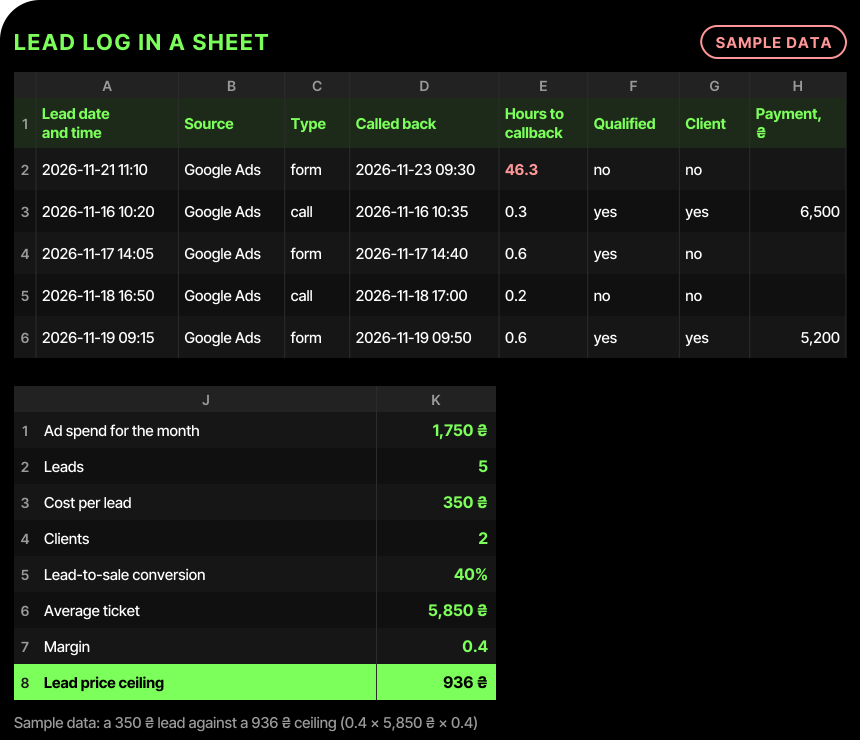
Formula in E2 (drag it down; format the column as a number with one decimal place): =IF(AND(ISNUMBER(A2),ISNUMBER(D2)),24*(D2-A2),"")
The labels for the totals sit in column J and the values in column K (the values below are hypothetical and do not match the main example):
| Cell | What | Formula | For the five rows |
|---|---|---|---|
| K1 | Ad spend for the month | typed in by hand from the ad account | 1,750 ₴ |
| K2 | Leads | =COUNTA(A2:A500) | 5 |
| K3 | Cost per lead | =IF(K2=0,"",K1/K2) | 350 ₴ |
| K4 | Clients | =COUNTIF(G2:G500,"yes") | 2 |
| K5 | Lead-to-sale conversion | =IF(K2=0,"",K4/K2) | 40% |
| K6 | Average ticket | =IF(K4=0,"",AVERAGEIF(G2:G500,"yes",H2:H500)) | 5,850 ₴ |
| K7 | Margin | typed in by you: 0.4 or 40%, not 40 | 0.4 |
| K8 | Lead price ceiling | =IF(COUNT(K5:K7)=3,PRODUCT(K5:K7),"") | 936 ₴ |
If your Google Sheets locale uses semicolons as separators, replace the commas in the formulas with semicolons.
Count qualified leads separately: cost per qualified lead = K1 ÷ the number of qualified leads (=COUNTIF(F2:F500,"yes")), and qualified-to-sale conversion = clients among the qualified leads ÷ qualified leads. Calculate the ceiling for them using this conversion and compare it only with the cost per qualified lead. In the five sample rows: 3 qualified, 2 clients, conversion 67%, ceiling 5,850 × 0.4 × 2/3 = 1,560 ₴, cost per qualified lead 1,750 ÷ 3 ≈ 583 ₴.
The log is useful for the advertising itself, too. According to Google's rules as of November 2026, you can upload statuses such as "qualified lead" and "client" from a CRM into Google Ads (within 90 days of the click, or 63 days for enhanced conversions for leads; ideally upload at least once a day). For bidding, Google advises choosing a single stage of the journey. A call from an ad counts as a conversion once it reaches the minimum call length that you choose, and calls can also be imported from a CRM. None of this helps without a record of leads.
What to do if the market is more expensive than your ceiling
If a lead in your market costs more than your ceiling, change one of the three values in the formula: the ticket, the margin or the share of leads that become clients.
- Ticket. Service packages, add-on services, a minimum order.
- Margin. For each service, compare what is left after direct costs × lead-to-sale conversion against the actual cost per lead.
- Closing. A faster callback and a clearly named person responsible. Count repeat orders only if they are in your data.
Sometimes a service simply does not pay off with this kind of advertising. It is better to learn that from a calculation than from an ad bill.
A Google Ads account audit helps you check what the ad account counts as a lead and how reliable the data is; you calculate the ceiling with the formula yourself. The ad account and the data in it belong to you. Setup and management: PPC advertising and Google Ads. We do not promise a cost per lead.
What to check with a contractor before signing a contract is covered in the article How to Choose a Google Ads Agency: 7 Red Flags.
Frequently asked questions
Is a 300 ₴ lead expensive?
The figure alone tells you nothing: compare it with your own ceiling. In the example above (a ceiling of 480 ₴), 300 ₴ fits with room to spare, while with a ceiling of 180 ₴ it is already above it.
How is a lead different from a client and from a qualified lead?
A lead is any call or form submission. A qualified lead is one where the person fits your services and wants to buy; track it separately in a CRM. A client is someone who has paid.
What lead-to-sale conversion is normal?
There is no universal number. It depends on the niche, the ticket and callback speed, so other people's percentages will not apply to you. Calculate your own: take the leads for a chosen period, see how many became paying clients, and give them the usual time to payment for your service.
Can an agency promise a cost per lead?
No, not reliably. Cost per lead depends on the auction, competition and season. Ask the contractor to explain how the cost per lead is calculated and what they propose to change.
How is cost per lead different from ROAS?
ROAS is revenue per hryvnia spent on advertising; it is convenient when the order value is known immediately, as in a store. With services, a lead becomes a deal later, so it is easier to calculate cost per lead and the ceiling. For more on ROAS, read the article ROAS: what it is and how to calculate it.