What ROAS is and how to calculate it
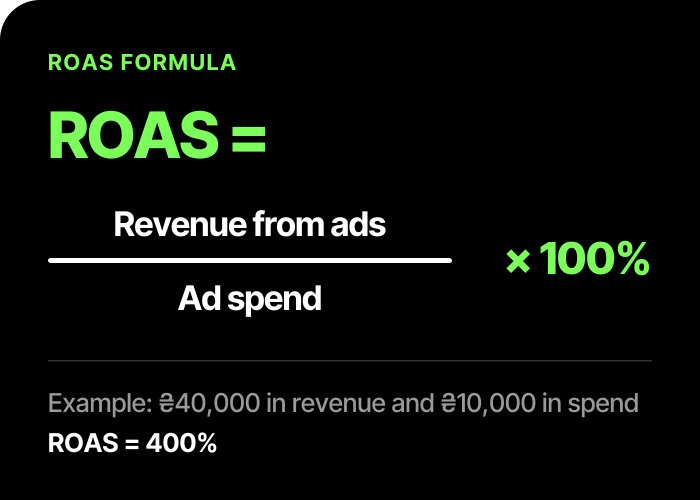
ROAS (return on ad spend) shows how much revenue you get per hryvnia of advertising: it is the revenue from ads divided by what you spent on them. Google Ads uses the same formula: conversion value ÷ ad spend. In a bidding strategy the target ROAS is set as a percentage, while reports show the metric as a ratio; to get the percentage, Google advises multiplying it by 100. The example from Google's help: $5 of sales for every $1 of spend is a ratio of 5, or a target ROAS of 500%.
ROAS = revenue from ads ÷ ad spend
A hypothetical example: you spent 10,000 ₴ (hryvnias), and the ads brought orders worth 40,000 ₴. ROAS = 40,000 ÷ 10,000 = 4. You can write this number as "4×", "4.0" or "400%". It is all the same thing, so just look at the form your report uses.
"Revenue from ads" in Google Ads is the conversion value passed by the tracking code on your site. For this calculation it has to equal the purchase amounts. If the code passes the wrong amount (before the discount), duplicates orders or counts other actions, you cannot compare it with revenue, and ROAS will be wrong. That is why you first check order tracking and only then judge the metric itself.
ROAS, ROMI and profit: what is the difference
From here on, margin means the share of the price that is left after the cost of the product and the variable costs of the order: delivery, payment fees, packaging.
- ROAS shows how much revenue each hryvnia of advertising brought. It knows nothing about the cost of the product.
- ROMI shows the return on marketing. There are different formulas: based on revenue and based on profit. So compare only like with like. We calculate it based on profit: ROMI = (revenue × margin ÷ 100 − all marketing costs) ÷ all marketing costs × 100%. The costs include the ad budget, the contractor's fee and other marketing expenses; in examples without a contractor we count only the ad budget.
- Profit: what is left in the store after ads, the contractor's fee and fixed costs. ROAS does not show it.
So two stores with the same ROAS of 4 can have opposite results: one in the black, the other in the red. The difference is the margin.
Break-even ROAS: the 100 / margin formula
Break-even ROAS is the level at which the margin income from orders covers the ad budget. The contractor's fee and the store's fixed costs (rent, salaries) are not included here: they are added separately, see the example below. The formula: 100 ÷ margin (%).
Here is why. From every hryvnia of revenue you keep the margin, say 0.25 ₴. For that 0.25 ₴ to pay back 1 ₴ of advertising, revenue has to be 1 ÷ 0.25 = 4 times the spend.
A few values:
| Margin | Break-even ROAS | As a percentage |
|---|---|---|
| 10% | 10 | 1000% |
| 15% | ≈ 6.7 | ≈ 667% |
| 20% | 5 | 500% |
| 25% | 4 | 400% |
| 30% | ≈ 3.3 | ≈ 333% |
| 40% | 2.5 | 250% |
| 50% | 2 | 200% |
Below this level, ads run at a loss, and above it they bring profit. But this is not the whole calculation: if you pay a contractor to manage the ads, that amount is also added to the costs (example below).
An example with hypothetical numbers
All the numbers in this section are made up for the calculation. They are not our clients' data and not a benchmark for your niche.
Picture a store: an average order of 2,000 ₴, a 25% margin, so 500 ₴ is left from every order. Ads cost 10,000 ₴ a month. Break-even ROAS = 100 ÷ 25 = 4, so revenue from ads has to be 40,000 ₴.
Three scenarios for the month (we do not count the store's fixed costs here):
| Revenue | ROAS | Margin income | After ad spend | ROMI |
|---|---|---|---|---|
| 30,000 ₴ | 3 | 30,000 × 0.25 = 7,500 ₴ | −2,500 ₴ | −25% |
| 40,000 ₴ | 4 | 10,000 ₴ | 0 ₴ | 0% |
| 50,000 ₴ | 5 | 12,500 ₴ | +2,500 ₴ | 25% |
Now the same revenue of 40,000 ₴ (ROAS 4), but with a 40% margin. Margin income is 40,000 × 0.4 = 16,000 ₴, after ad spend +6,000 ₴, ROMI 60%. The ROAS is the same, but the result is different.
If you add a contractor's fee of, say, 3,000 ₴ a month, total costs come to 13,000 ₴. Let us go back to the hypothetical example with a 25% margin. With an ad budget of 10,000 ₴ and a contractor's fee of 3,000 ₴, break-even ROAS = (13,000 ÷ 10,000) × (100 ÷ 25) = 5.2. Check: revenue 52,000 ₴, 52,000 × 0.25 − 13,000 = 0 ₴.
What ROAS counts as good
There is no universal number. What your benchmark depends on:
- Margin. This is the basis: break-even ROAS is calculated from it.
- Average order value. On expensive products the fixed costs per order (handling, delivery) eat a smaller share of the price, on cheap ones a larger share. So those who sell low-priced items often need a higher ROAS.
- Repeat purchases. If a customer comes back, you can deliberately run the first order at zero return and earn on the following ones. This is a business decision, not a guarantee, and it is worth confirming with your own data on repeat orders.
- The goal. For one business the priority is revenue growth, for another it is current profit.
Apply other people's "normal 400%" to your store only after you have done the calculation. Your bar is break-even ROAS plus a cushion for profit.
ROAS in Shopping and Performance Max
Google Ads has a bidding strategy called Target ROAS. You set the average conversion value per hryvnia of spend, and Google predicts the value of each conversion and adjusts bids. According to Google's help as of November 2026, it is supported in Search campaigns, Shopping campaigns and Performance Max.
What to know about it:
- Search and Shopping campaigns need at least 15 conversions in the last 30 days, and the conversion value has to be passed;
- before switching to this strategy, Google advises passing conversion value for at least 4 weeks or one to two conversion cycles (whichever is longer);
- a target that is too high can limit traffic;
- after you change the target, a campaign may need one to two conversion cycles to reach the new value;
- as a starting point, Google suggests the campaign's actual ROAS over the last few weeks.
Compare actual ROAS with break-even ROAS and set the target with a cushion for profit: a target exactly at break-even gives all the margin to advertising. The target in the strategy does not guarantee a return by itself; Google advises starting from the campaign's actual ROAS over the last few weeks.
In Performance Max, retail stores can connect products from Merchant Center. A target ROAS is optional there: Google's help calls it optional.
Separately about profit. Google Ads can show gross profit in reports if you pass cart data (conversions with cart data) and add the cost of goods to the Merchant Center feed. This helps you see which products bring profit, not just revenue.
How the campaign itself works and who it suits is covered in the article Performance Max: what it is and who it suits.
Common mistakes
A quick diagnosis: what you see in the report and where to look for the cause.
| What you see | Likely cause | What to check |
|---|---|---|
| Conversion value in the report is higher than revenue in the store | The code passes the amount before the discount, duplicates orders or does not subtract returns | Compare the report with the list of orders in your system for the same week |
| ROAS looks good, but no money is left | The margin is lower than you assumed: delivery, fees and packaging are not counted | Recalculate break-even ROAS with all variable costs |
| Overall ROAS is good, but the budget melts away | Products with different margins are mixed into one number | Look at ROAS separately by product or group |
| ROAS changed sharply within a few days | Conversions arrive with a delay, or the campaign strategy changed | Judge by full conversion cycles |
More on each cause:
- Looking at ROAS without margin. This is the main mistake: a figure of 4 can mean either profit or a loss.
- Ignoring returns and cancellations. Take an example with revenue of 50,000 ₴ and a 25% margin. Suppose returns are 10% of revenue, there are no extra costs for them, and the margin on the remaining sales stays at 25%. Actual revenue: 50,000 × 0.9 = 45,000 ₴. Margin income after ad spend: 45,000 × 0.25 − 10,000 = 1,250 ₴ instead of 2,500 ₴, and actual ROAS is 4.5. The ROAS in the report will stay at 5 if tracking does not subtract returns.
- Ignoring order costs. Another hypothetical example: an order of 2,000 ₴, a product cost of 1,400 ₴. Margin before other variable costs = (2,000 − 1,400) ÷ 2,000 × 100% = 30%, break-even ROAS ≈ 3.33. But if you pay for delivery (100 ₴) and the payment fee (40 ₴), what is left is 2,000 − 1,400 − 100 − 40 = 460 ₴, or 23%. Break-even ROAS is now 100 ÷ 23 ≈ 4.35.
- Looking at the average across the whole catalog. One overall ROAS hides products with different margins: some bring profit, others quietly eat the budget.
- Drawing conclusions from a few days. Conversions arrive with a delay, and after a change of campaign strategy it takes time. Judge by full conversion cycles.
To learn about sending products to Google Ads, read the Merchant Center setup guide.
Calculate it for your store
Open the Google Ads return on ad spend calculator: enter the budget, cost per click, average order value, margin, conversion rate and the contractor's fee. It will show orders, revenue, ROAS, break-even ROAS and ROMI based on profit. This is a guideline, not a forecast: the real result depends on the niche, the site and competition.
If ROAS in the report is high but no money is left after ads, that is a reason for a Google Ads account audit: we will check order tracking, returns and products with a loss-making ROAS, and tell you what exactly is eating the margin. Setup and management of Shopping ads: Google Shopping and Merchant Center setup, turnkey; a strategy for a store: Google Ads for online stores.
Frequently asked questions
Is a ROAS of 400% good or bad?
It depends on the margin. 400% means a ROAS of 4. At a 25% margin it only covers the ad budget; with a higher margin the ads are in the black, with a lower one in the red. If there is a contractor's fee or other costs, the threshold is higher: for example, with a budget of 10,000 ₴ and a contractor's fee of 3,000 ₴ it is 5.2.
How is ROAS different from ROMI?
ROAS counts revenue per hryvnia of advertising and ignores the cost of goods. In our calculation, ROMI shows the return based on profit. ROMI formulas differ, so before comparing, check which one is used.
What ROAS should I set as the target of a bidding strategy?
One with a cushion above break-even. As a starting point, Google suggests the campaign's actual ROAS over the last few weeks; a target that is too high can limit traffic, and the target itself does not guarantee a return: that comes from the margin.
How many conversions do I need for a target ROAS?
According to Google's help as of November 2026, Search and Shopping campaigns need at least 15 conversions in the last 30 days. Other campaign types have different requirements.
Can I skip the margin if I know my ROAS?
No. Without margin, ROAS shows only turnover, not whether you earned anything from the ads.
How is ROAS different from ROI?
ROI shows the return on all of a business's investments: profit relative to the money invested. ROMI is the same only for marketing, and ROAS is only revenue per hryvnia of advertising, without the cost of goods.
Why does the conversion value in the report not match revenue in the store?
Most often the tracking code passes the wrong amount: before the discount, with duplicate orders, or together with other actions. The report may also not subtract returns and cancellations. First check order tracking.