What remarketing is, in plain terms
Remarketing is advertising for people who have already interacted with your site, app or videos. Some of them may be prospects, others existing customers. Google collects them into a list and shows them your ads on the Display Network, on YouTube and in Search.
In Google's help center, remarketing is now called "your data" (data segments), but the term "remarketing" has not gone away. There is no separate service behind it: the list is attached to a Google Ads campaign as an audience.
Most store visitors do not buy on the first visit. Remarketing reminds people who have already shown interest in your store.
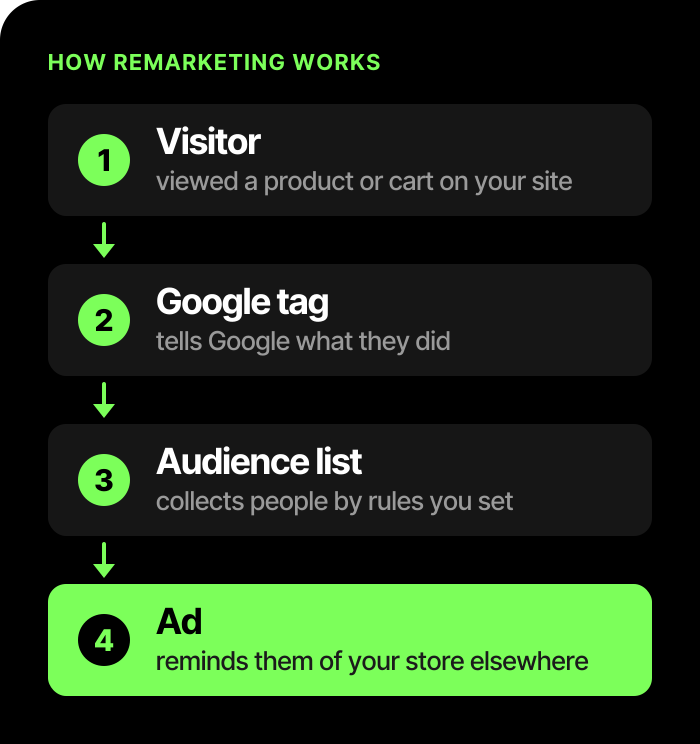
The path from a visit to an ad:
Types of remarketing
Under Google's rules as of November 2026, a list can be built from several sources:
| Type | Who goes into the list | What matters |
|---|---|---|
| Website visitors | People whom the Google tag on your pages added to the list | The list conditions decide who is included: all visitors, visitors to a category, or those who opened the cart |
| App users | People who use your mobile app | The same as for a site, but for an app |
| Customer lists (Customer Match) | Contacts that customers left with you themselves | Only those who are signed in to a Google account see the ads |
| YouTube users | People who interacted with your videos or channel | Fits if you have videos or a channel on YouTube |
How dynamic remarketing works
Regular remarketing uses ads prepared in advance: for example, about a promotion or a product category. In dynamic remarketing, products are inserted from the feed based on the visitor's actions: photo, name, price.
Product data comes from the store's feed in Merchant Center. That is why one product feed can serve both dynamic remarketing and Google Shopping. If the feed is already set up, you do not need a separate catalog.
The order of steps, per Google's help center:
- In Merchant Center, turn on dynamic remarketing for the account.
- Send product data (the feed) to Merchant Center.
- Link the Merchant Center and Google Ads accounts.
- In Google Ads, create a dynamic remarketing campaign.
- Add the dynamic remarketing tag, which passes product data, to your site.
The product ID that the tag passes from the page must match the ID in the feed. If they differ, Google cannot pick the right ad.
To prepare Merchant Center and the feed itself, see the article Google Merchant Center: what it is and how to set it up.
The dynamic remarketing tag: what you need from a developer
The tag tells Google which products a person viewed, put in the cart and bought. Without it, Google does not know which product to insert into the ad. The tag is installed by the store's developer or by an advertising contractor: usually through Google Tag Manager, without changes to the page code. The timeline depends on the store, so agree on it with the developer before you start.
What to check yourself after the developer is done:
- in Google Ads, the warning next to the site data source that the tag is not passing product data has disappeared, and the "viewed a product" and "added to cart" lists have started to fill up;
- the developer has shown you in preview mode that the product page, the cart and the "thank you for your order" page pass to Google the same product ID that is in the feed;
- reopening the "thank you" page does not count as a second purchase.
A brief for the developer (what exactly to set up and how to check it) and an AI prompt, if you decide to do it yourself, are in our Telegram: get the file.
Where to run it: a Display campaign or Performance Max
Per Google's help center, dynamic remarketing works in Display campaigns, in Performance Max and in app campaigns.
- Display campaign. You choose the lists, bids and ads yourself. The ads are responsive display ads: add a logo, images and text for cases where a product cannot be inserted.
- Performance Max with a Merchant Center feed. If the dynamic remarketing tag is on your site, Google turns it on in the campaign automatically. It is harder to manage remarketing separately here. We wrote about the format itself in the article Performance Max: what it is and who it suits.
In both cases, Google Ads does not show a report by individual product in dynamic remarketing, so look at sales by product in your own analytics.
How to segment the audience
The "all visitors" list combines people with different intentions. Splitting by actions helps you prepare different ads for them. A typical split:
| Segment | What to show | Whom to exclude |
|---|---|---|
| Viewed a category | General ads or product collections. You can keep people in the list longer | Those who have already viewed a product, added to the cart or bought |
| Viewed a product | Dynamic ads with these products | Those who added to the cart or bought |
| Added to the cart but did not buy | A cart reminder. The list duration is shorter | Buyers |
| Bought | Not the same products again. For related or repeat-purchase products, show ads some time after the order | They are excluded from campaigns for these products |
So that segments do not overlap, exclude the "hotter" list from the broader one.
What you need to launch
The minimum set:
- The Google tag on all pages of the site. One Google Ads account needs one tag, and on product pages it also passes product data.
- A visitor list. It may take 48–72 hours for data to appear in a new list. This period does not guarantee that the list will reach the minimum size for ads to show.
- List size. To show ads on the Display Network, in Search and on YouTube, the list must have at least 100 active visitors in the last 30 days (per Google's help center). For customer lists uploaded or updated after February 1, 2024, the threshold is also 100 users; older lists must have at least 1,000 matches.
- Membership duration. For visitor lists on the Display Network and in Search, the default is 30 days and the maximum is 540.
- Merchant Center with a feed for the dynamic format and, if needed, a link between Google Analytics 4 and Google Ads, to use GA4 audiences.
Google changes these numbers, so check them against the current help center before you launch.
Common remarketing mistakes
A quick diagnosis: what you see and where to look for the cause.
| What you see | Likely cause | What to check |
|---|---|---|
| Ads do not show | The list is smaller than the threshold (100 active visitors in 30 days) or the tag is set up incorrectly | The list size, and whether the "viewed a product" and "added to cart" lists are filling up |
| People who already bought still see ads | The buyers segment is not excluded | Exclusions at the campaign or ad group level |
| The same people see ads too often | The frequency is not capped | Frequency settings. Demand Gen does not support frequency capping |
| People outside your lists see your ads | Optimized targeting was left on | Turn it off in the ad group for a campaign aimed only at visitors |
| Dynamic ads without products | The ID in the tag does not match the feed, or the product did not pass the review for dynamic remarketing | Compare the ID in the tag and in the feed, the product status, and whether dynamic remarketing is turned on in Merchant Center |
More detail on each mistake:
You did not exclude people who already bought. Check that the buyers segment is excluded at the campaign or ad group level (after the campaign is created). Exclusions work for first-party data and may not apply to people who turned off ad personalization.
Ads show too often. In Display campaigns, Google can optimize frequency itself, or you set a limit manually (only viewable impressions count). Demand Gen does not support frequency capping (per Google's help center).
You left optimized targeting on. In Display campaigns it is on by default and looks for people outside your lists (per Google's help center). For a campaign only for site visitors, turn it off in the ad group settings.
A small or empty list. If the tag is set up incorrectly or there is little traffic, the list will not reach the threshold, and the ads will not show.
Feed errors. Check the product status specifically for dynamic remarketing. Approval or disapproval in Shopping does not determine it automatically: the policies of these formats differ. Also check whether dynamic remarketing is turned on in Merchant Center.
Google policy restrictions
Remarketing falls under the personalized advertising policy. Under Google's rules as of November 2026, you cannot use first-party audiences for sensitive categories (among them health, alcohol, gambling, religious beliefs, financial hardship): neither visitor lists nor customer lists (per Google's help center).
A few more rules:
- exclusion lists, such as buyers, cannot be used as lists of users who should be shown personalized ads;
- you cannot combine personal data (name, phone, email) with anonymous or pseudonymous information in lists, cookies or feeds;
- the site must have a privacy policy about collecting data for remarketing;
- for users in the EEA, consent signals are required when you upload customer lists.
How we approach remarketing
Remarketing does not replace Search and Shopping ads: it works with the warm audience that those formats have already brought to the site. The report shows attributed conversions, but on its own it does not prove that these purchases would not have happened without the ads. That is why, for a store, it is usually launched together with Google Shopping and Merchant Center, after checking the tags and goals. If ads are already running but the result is unclear, start with a Google Ads account audit. For the overall picture of formats, see the Google Ads advertising page. No one can guarantee the number of orders or the return on remarketing.
Frequently asked questions
How is remarketing different from regular advertising?
Regular advertising looks for new people by queries or interests. Remarketing works with those who have already interacted with your site, app or videos.
Do I need Merchant Center for remarketing?
Not for standard remarketing: a tag and a list are enough. For dynamic remarketing, you need Merchant Center with a product feed.
How many people must be in the list?
Per Google's help center as of November 2026, at least 100 active visitors in the last 30 days for the Display Network, Search and YouTube. The 1,000-match threshold applies to customer lists uploaded before February 1, 2024 and not updated after that date. Membership durations are in the section "What you need to launch".
What should I give the developer for the dynamic remarketing tag?
A list of actions that the tag must report to Google: viewing a category and a product, adding to the cart, a purchase and, if needed, a site search. And the main requirement: the product ID in the tag must match the ID in the feed. The ready brief is at the link in the section "The dynamic remarketing tag".
Can I avoid showing ads to people who already bought?
Yes, exclude the corresponding segment in the campaign or ad group.
Do I need remarketing?
Most store visitors do not buy on the first visit, and remarketing works with exactly those people. Look in your analytics at what share of orders comes from a visit other than the first: if almost everyone buys right away, remarketing will give you less. You also need traffic: without a list of sufficient size, the ads will not show.
Why are my remarketing ads not showing?
Most often the list is smaller than the threshold: per Google's help center as of November 2026, you need at least 100 active visitors in the last 30 days. Also check whether the tag is set up correctly and whether 48–72 hours have passed since the list was created.