What Performance Max is and where your ads appear
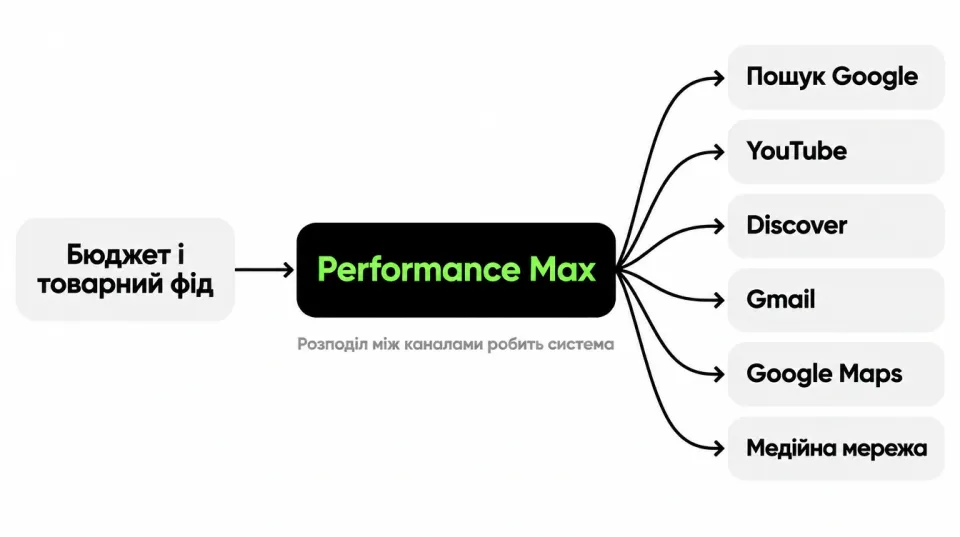
Performance Max is a Google Ads campaign that picks placements based on a goal, not on keywords. Google describes it as a campaign type that opens up access to all of Google's ad inventory from one place. You set goals and conversions and add assets: text, images, video, and for a store, a product feed as well. The system decides where, to whom and at what bid your ads are shown.
You set the goals, budget, feed, assets and audience signals. The system picks the individual impressions on its own. This saves time, but you hand part of the control to Google. For a store there is one more detail: Performance Max replaced Smart Shopping campaigns, which Google automatically moved to the new format. Merchant Center and the feed stayed the same.
One campaign can show ads across Google channels:
- Google Search;
- YouTube;
- Discover;
- Gmail;
- Google Maps;
- the Google Display Network, meaning partner sites and apps.
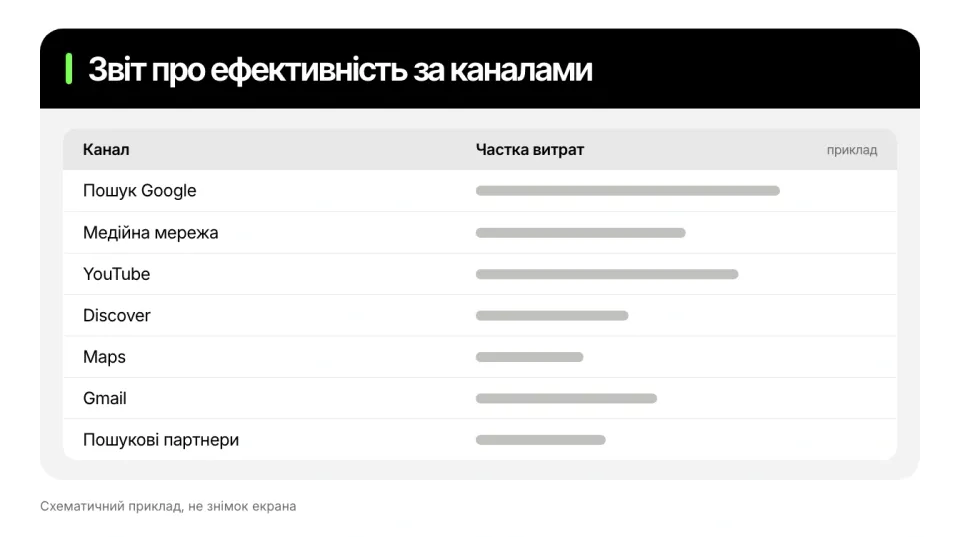
In the channel report, Google also lists search partners separately. For products, this means a card with a photo and a price can appear not only in search or on the Shopping tab, but also in YouTube recommendations or in Gmail. The budget is split across channels automatically, and you can see the result in the channel report. For comparison, a standard Shopping campaign shows products on the Shopping tab, in Google Search, in Google Images and, if you turn it on, on search partner sites.
How it works: the feed, assets and audience signals
To launch Performance Max for a store, you link the campaign to Merchant Center. For that, your site must be verified and claimed, shipping must be set up, and your Google Ads and Merchant Center accounts must be linked. After the campaign is created, you cannot change the Merchant Center account.
The feed is the foundation. It supplies the product name, photo, price and availability. If the campaign goal is online sales, the feed is the starting point, while text, images and video extend your reach. Google also advises watching data quality: check products with issues, update prices and availability on time, and mark priority products with your own labels, for example "bestseller".
Audience signals are a hint, not targeting. These are remarketing lists, customer lists (Customer Match) and custom segments. They help the system understand faster who to look for. Google calls your own data the most valuable. We cover how to build such lists in our article on remarketing in Google Ads.
Conversions determine which actions the campaign optimizes for. If your orders have different values, Google advises passing the value of each transaction.
Settings you should not leave at the defaults
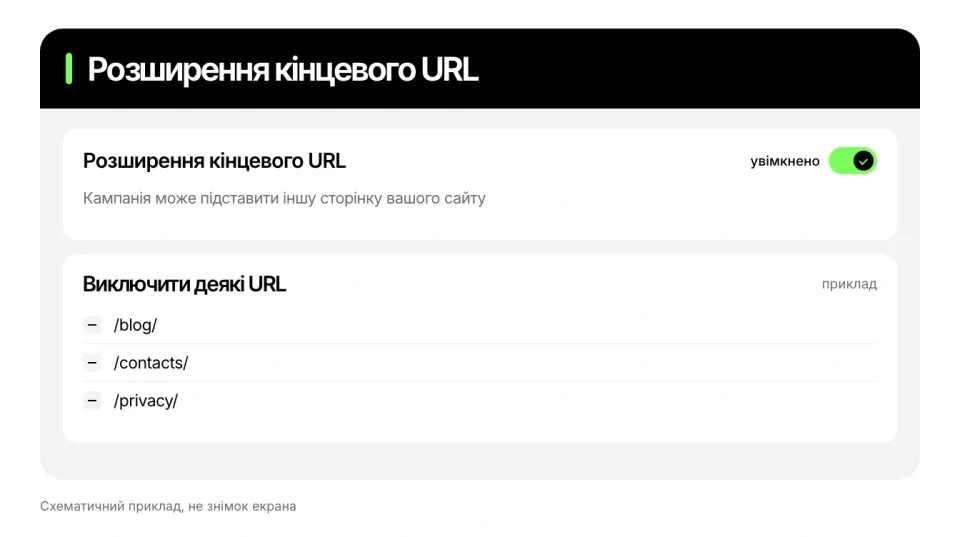
- Final URL expansion. It is on by default: instead of your link, the campaign can send people to another page of the same domain that it considers more relevant. Google warns that without exclusions, ads can lead to unexpected pages. You turn the feature off in the campaign settings, and you can exclude individual addresses (for example, the blog or contacts) or whole sections with rules.
- Locations and languages. After creating the campaign, check that it lists exactly the regions you deliver to and the languages your site is in.
- Search themes. Up to 50 search themes per asset group. They add to the automatic query matching in Performance Max and do not replace it. Negative keywords still apply.
- Assets. Even if the campaign is built on the feed, review which text and images the system pulls in and replace the weak ones.
Who Performance Max suits and what to check before launch
Google offers Performance Max to advertisers who want online sales or leads. For an online store it makes sense when the catalog has dozens of products across several categories, purchase tracking is set up correctly, and you are ready to give the campaign time and not change the budget every week. It also helps if you have your own customer base that you can pass in as a signal and want to reach not only search but also YouTube, Gmail and Discover.
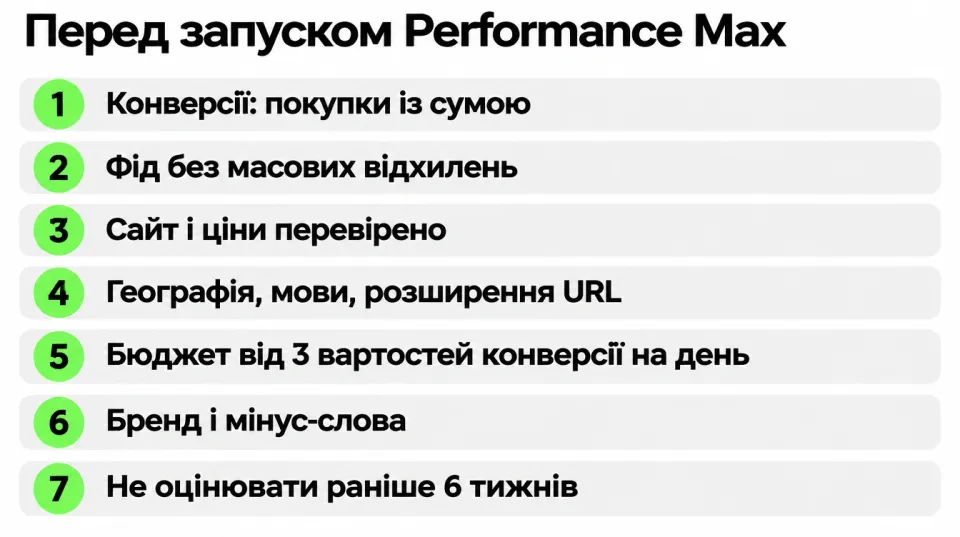
Before launch, check:
- Conversions. Only purchases (or qualified leads) are in your goals, and orders are passed with their value. Compare the number of conversions in Google Ads with real orders in your CRM.
- Feed. Merchant Center has no mass disapprovals, and prices and availability match the site.
- Site. Go from the home page to checkout on your phone and compare prices on key products with competitors. Ads will bring a person to the site, but they will not fix an inflated price or an inconvenient checkout.
- Settings. Locations, languages, final URL expansion (see above).
- Budget. Google recommends an average daily budget of at least three times the cost per conversion for the selected goals. This is not a ban on starting with less: decide separately how much you are ready to spend on a test.
- Brand and negative keywords. Decide whether you need a brand exclusion, and add the obvious negative keywords.
- Time frame. Google advises giving a new campaign at least six weeks to learn. This is about the final assessment: check spend, purchase tracking and the pages the ads lead to from day one.
When Performance Max is not a fit
Postpone the launch if purchases are tracked incorrectly or a significant share of products is disapproved. The remaining points are signs that there is not yet enough data to decide.
- There are no reliable conversions. Without purchase tracking, the campaign has nothing to optimize. If page views or phone clicks are counted, the system will look for exactly those.
- There is very little purchase data. Google says that the more conversion data there is, the faster the campaign delivers results. It does not name a minimum number.
- The feed has errors. Products disapproved for Shopping do not get into product ads. First deal with the statuses in Merchant Center and check which format the product is disapproved for: the rules for Shopping and dynamic remarketing differ.
- The budget is too small for your order cost. If a conversion costs 300 ₴, then by Google's guideline that means at least 900 ₴ a day (an arithmetic example, not a forecast). On high-traffic days, spend can reach twice the daily budget, and other days balance this out. At the start, avoid frequent changes to the budget and bidding strategy: they can restart learning.
- You need control down to a single product or query. In Performance Max it works differently: through assets, signals, negative keywords and brand exclusions. If it matters to you to set bids manually on product groups, a Shopping campaign is a better fit.
Performance Max or a Shopping campaign: which to start with
Google's help center has no universal rule on what is better to start with. As of November 2026, the picture is as follows.
What Google says. A Shopping campaign runs on feed data instead of keywords: you create product groups and set bids on them. Performance Max covers more channels and works through asset groups and goals. There is a tool for choosing: an experiment that compares an existing Shopping campaign with a Performance Max campaign with similar settings.
| Parameter | Shopping campaign | Performance Max |
|---|---|---|
| What drives delivery | Feed data instead of keywords, product groups | Goals and conversions, the feed, asset groups |
| Where it shows | Shopping tab, Google Search, Google Images, search partners (if enabled) | Google Search, YouTube, Discover, Gmail, Google Maps, the Display Network |
| Bids | You assign them to product groups, including manually | Automatic, based on the selected goals |
| Control | Product groups and bids on them | Assets, audience signals, negative keywords, brand exclusions |
Outdated claims. Some texts say you cannot add negative keywords in Performance Max. Google now describes negative keywords at the account level (up to 1,000) and the campaign level (up to 10,000), as well as brand exclusions.
How to choose. If you need manual bids on product groups, take a standard Shopping campaign. If you want to reach several channels with automatic bidding, go through the checklist above and launch Performance Max. If a Shopping campaign is already running, compare the two types with an experiment on your own data, not by a general rule.
Common mistakes and signs that something is wrong
- Launching without clean tracking. The campaign learns from what you showed it. If extra actions are counted, the campaign will bring you those, not buyers.
- Not cleaning the feed. Errors and disapproved products from the Merchant Center report go unnoticed, and some of the products are left out of the ads.
- Judging after a week. For new campaigns Google advises at least six weeks and warns that frequent changes can restart learning.
- A ROAS target that ignores margin. Google advises setting the target based on the margin you need, taking into account cost of goods and customer value.
- Brand queries. If you already have a Search campaign with an exact match keyword, Google gives it priority over Performance Max when the query is identical to the keyword and the keyword is eligible to show (not limited by budget, targeting or disapproved ads). Without a brand exclusion, the campaign can take orders that would have come anyway and look more effective than it is.
- Looking only at campaign ROAS. It does not show whether customers are new or returning. For that, Google has a separate new customer acquisition goal.
- Not looking at the channel report. The split between Search, YouTube and other channels may turn out different from what you expected.
Signs that a campaign needs a review, and what to check:
| What you see | What to check |
|---|---|
| The account shows noticeably more conversions than there are orders in your CRM | What exactly counts as a conversion: only purchases (or qualified leads) should be in your goals |
| A noticeable share of the budget goes to a channel you did not expect | The channel report |
| Ads lead to blog or contact pages | Final URL expansion and the list of excluded addresses |
| The number of products with issues in Merchant Center is growing | Product statuses and reasons for disapproval |
| The campaign takes orders that would have come anyway | Brand exclusions |
| A week has passed and the result is unclear | Do not judge earlier than six weeks, but check spend and tracking from day one |
What to look at once a week:
- whether the number of conversions in Google Ads matches the orders in your CRM;
- how spend is split across channels;
- whether the number of products with issues in Merchant Center has grown;
- which pages the ads lead to;
- whether the budget and bidding strategy were changed without need: frequent changes can restart learning.
To calculate your break-even ROAS from your margin, see the article ROAS: what it is and how to calculate return on ad spend.
Frequently asked questions
Has Performance Max replaced Shopping campaigns?
Partly. Google automatically moved Smart Shopping campaigns to Performance Max. Standard Shopping campaigns remain, and Google's help center still describes them separately and suggests comparing the two types in an experiment.
How many conversions do I need, and can I start without history?
Google does not name a minimum. It only says that the more conversion data there is, the faster the system delivers results. You can launch without history; nobody can tell you in advance how long learning will take. First check that purchases are passed with their value, and set a budget for the test. A "Shopping campaign vs. Performance Max" experiment makes sense when a Shopping campaign is already running and the budget covers both.
What should the budget be?
Google recommends an average daily budget of at least three times the cost per conversion for the selected goals. This is not a ban on starting with less: decide separately how much you are ready to spend on a test. Google advises giving a new campaign at least six weeks to learn; check spend and tracking from day one.
Should I turn off other campaigns when launching Performance Max?
You do not have to turn them off. Search campaigns with an exact match keyword take priority over Performance Max if the query is identical to the keyword and the campaign is eligible to show, and you can compare a Shopping campaign with Performance Max in an experiment.
Does Performance Max guarantee orders?
No. It is an optimization tool, and the result depends on the feed, tracking, the site, prices and competition. Neither Google nor an advertising agency can guarantee a number of orders or a ROAS.
How often can I change the budget and settings?
At the start, avoid frequent changes to the budget and bidding strategy: they can restart learning. Google advises giving a new campaign at least six weeks, and you should check spend and tracking from day one.
Should I exclude the brand?
It depends on the store. If you already have a Search campaign with an exact match keyword, Google gives it priority over Performance Max when the query is identical to the keyword. Without a brand exclusion, the campaign can take orders that would have come anyway, so decide this before launch.
What's next
If you doubt that your store is ready for Performance Max, order an ad account audit: we will check purchase tracking, the feed and campaign settings, and tell you whether to launch, finish the groundwork first, or revisit the current campaign. Feed and campaign setup is covered in Google Shopping and Merchant Center setup, and the strategy for a store in Google Ads for online stores.